RocKnow: Rock ID & Collection
River Stone TechLifestyle
4.6152.00 Reviews
- Version
- 1.1.42.0630
- Installs
- 50.00K
- Age Rating
- Everyone
Screenshots
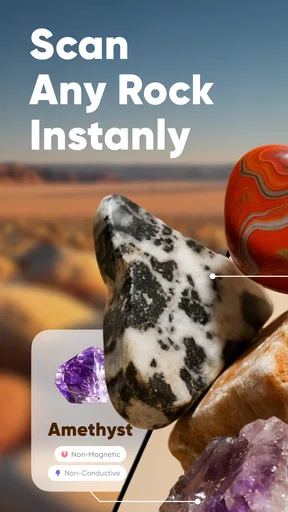
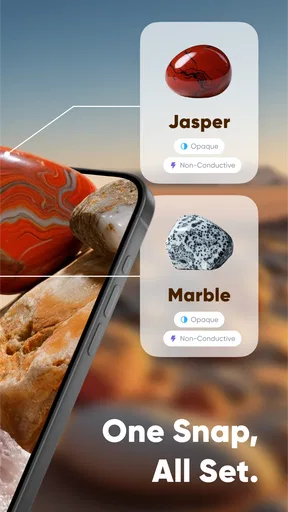
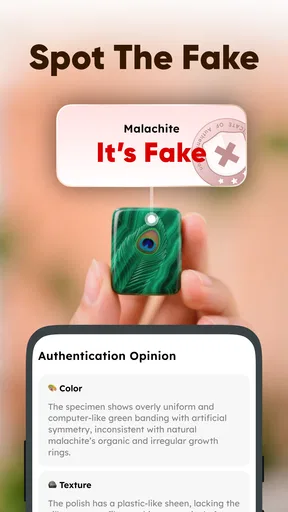
Our Review of RocKnow: Rock ID & Collection
 Analysis by Appyee
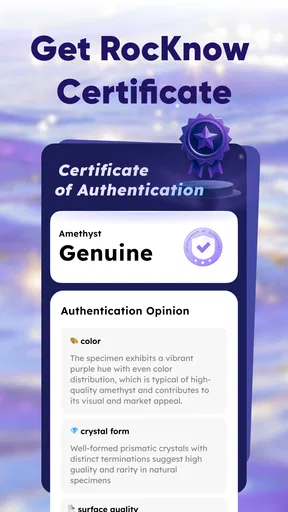
I approached RocKnow: Rock ID & Collection as the sort of app you open with a stone in one hand and a phone in the other. Its purpose is straightforward: help identify rocks through a quick scan, then provide clues about rarity, value, and authenticity. That makes it appealing to casual collectors, hikers, families, and anyone who has ever picked up an unusual-looking stone and wondered what it was.
After using it as a lifestyle tool rather than treating it like a laboratory instrument, my view is positive but measured. The app is most useful when it turns curiosity into a repeatable identification habit. It gives you a starting point for research without forcing you to begin with geological terminology. At the same time, its results should be treated as guidance, especially when a specimen might have meaningful financial or scientific importance.
River Stone Tech publishes the app, which is free to install and suitable for Everyone. It has reached over 50 thousand installs and holds a 4.6 average from around 1.1 thousand ratings, so it has already attracted a noticeable audience without feeling like an obscure experiment. The current release is version 1.1.42.0630, and it works on Android 8.0 or later.
How I decided whether RocKnow is worth using
For a rock-identification app, I look beyond the speed of the scan. The important question is what happens after the first result appears. A useful tool should help me understand why a specimen might match a particular type, encourage sensible photography, and separate an interesting possibility from a confident conclusion. I also want to know whether it fits a quick outdoor check, a home collection, or a more careful cataloging routine.
That last point matters because a phone camera sees appearance, not composition. Color, texture, lighting, moisture, and camera processing can all influence an image. A wet stone may look darker and more polished than it does when dry. Artificial light can hide subtle grain, while a cluttered background can make the edges difficult to read. I found that the quality of my scan depended heavily on how deliberately I presented the sample.
A better scanning routine than simply pointing and tapping
My most reliable workflow was to clean loose dirt from the surface without aggressively altering the specimen, let it dry, and place it against a plain background. I then captured more than one view when the shape or texture seemed important. A close image showed surface detail, while a wider view helped preserve the overall form. This is a small habit, but it makes the app more useful because the result is based on a clearer visual record.
I also learned not to let the first attractive match end the investigation. If RocKnow suggests a familiar rock, I compare that suggestion with what I can actually observe: grain size, visible layers, translucency, metallic shine, pores, and the way the stone breaks or wears. The app is best used as the first stage of a decision process, not the final authority.
The strongest habit is to scan for orientation, then verify with observation. That approach prevents a tempting label from becoming an unquestioned fact. It is especially important when the app mentions rarity, value, or authenticity, because those subjects involve context that a photograph alone may not capture.
Why the rarity and value angle is useful, but easy to misunderstand
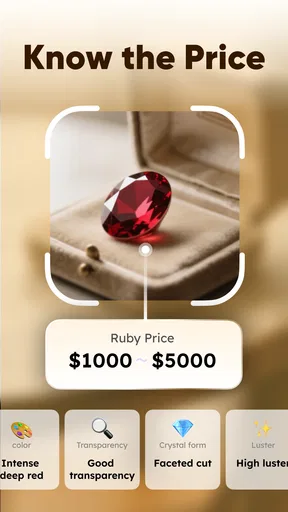
Many people do not want identification purely for academic reasons. They want to know whether a beach find is ordinary, whether a family collection contains something unusual, or whether a stone bought at a market deserves closer attention. RocKnow speaks directly to that curiosity by connecting identification with rarity, value, and authenticity information.
In practice, I would use those details as prompts for further checking. A potentially uncommon specimen deserves better photographs, notes about where it was found, and comparison with a trusted reference. A possible value indication should never be confused with a guaranteed sale price. Condition, size, provenance, treatment, demand, and expert verification can all change the outcome. The app is helpful because it tells me which questions to ask next, not because it replaces those questions.
This makes the app particularly useful for beginners who would otherwise search broad image results and become overwhelmed by similar-looking stones. It gives the search a direction. Instead of typing vague descriptions into a browser, I can begin with a visual lead and then investigate the characteristics that separate close alternatives.
Everyday scenarios where it earns a place on the phone
Imagine taking a walk with a child who finds a striped stone near a trail. Rather than giving a quick guess, I would photograph it with RocKnow, discuss the suggested possibilities, and use the moment to compare colors, layers, and texture. The app turns an ordinary interruption into a small learning activity. Even if the first identification needs later confirmation, the child leaves with a better way to look at rocks.
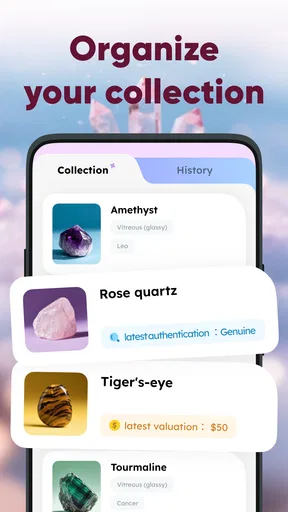
For an adult collector, the workflow is different. I would scan a new specimen when bringing it home, record the suggested identity in my own notes, and keep the image alongside the location and date of discovery. That creates a useful personal trail. If a later reference disagrees with the initial result, I can revisit the original image instead of relying on memory.
It can also help when sorting an inherited box of stones. The goal in that situation is not to assign a perfect scientific label immediately. It is to divide the collection into broad groups: items that look ordinary, items that deserve closer research, and items whose authenticity or value should be checked by someone qualified. RocKnow is well suited to that first pass because it reduces the number of specimens needing deeper attention.
Where this app wins over ordinary image searching
The clearest advantage is focus. A general image search can show thousands of visually similar rocks, but it leaves the user to decide which terms to try. RocKnow starts from the specimen itself and keeps the experience centered on identification. That is more comfortable for someone who knows what a rock looks like but does not know whether to search for a mineral, a gemstone, an ore, or a geological formation.
It also fits the pace of discovery better than opening several reference pages while outdoors. A quick scan can give me a working hypothesis before I return home to examine the sample under better light. That makes it a practical companion for walks, collecting trips, and casual field observations.
Compared with a traditional printed guide, the app is easier to carry and quicker when I am uncertain where to begin. A book remains better for slow comparison and deeper reading, but it assumes I can navigate its categories. RocKnow lowers that initial barrier. I can start with the object rather than with a vocabulary lesson.
Its collection-oriented usefulness is another quiet strength. Even when I am not trying to buy or sell anything, information about possible rarity and authenticity changes how I handle a specimen. I become more careful about preserving its condition, photographing it properly, and avoiding unsupported claims. That is a healthier collecting mindset than immediately treating every unusual stone as valuable.
Limits that affect the decision
The main limitation is inherent to visual identification. Similar rocks can share colors and patterns, while one specimen can look very different depending on lighting, moisture, or wear. A scan may therefore be convincing without being conclusive. I would not use the app alone to certify a gemstone, authenticate a purchase, establish a professional valuation, or make a geological claim that carries legal or financial consequences.
There is also a learning curve in taking useful photos. The scan may feel quick, but preparing the sample well takes more effort than pointing the camera at it. If I am walking in bright sunlight, dealing with a reflective surface, or trying to photograph a tiny fragment, the result may be less dependable. This is not a reason to reject the app, but it is a reason to judge its convenience realistically.
Another trade-off is that beginners may place too much confidence in a polished result. A clear label can feel more certain than the evidence warrants. I recommend reading the result as a shortlist and checking whether the suggested identity matches the visible characteristics. When the match feels weak, rescan rather than forcing the specimen into the first category offered.
The app may also be less satisfying for experienced geologists or serious collectors who already have a strong identification workflow. Someone who routinely uses field tests, specialist references, or professional contacts may find a visual scan too broad for their needs. In that case, RocKnow can still serve as a convenient first pass, but it should not replace the tools that person already trusts.
When another kind of tool is the better choice
If your priority is detailed education, a geology reference book or specialist database may be the better companion. Those options usually demand more effort, but they encourage careful comparison of formation, hardness, cleavage, streak, and other characteristics that a quick visual interaction cannot fully establish. They are preferable when the goal is study rather than fast discovery.
If you need professional authentication or valuation, the right alternative is a qualified specialist, gemologist, museum resource, or reputable testing service, depending on the specimen. RocKnow can help you prepare questions and decide which items deserve attention, but a visual app should not be the final step for a potentially expensive transaction.
If you only want to identify one rock once, installing an app may feel unnecessary. A local club, library guide, or knowledgeable collector could be more efficient. RocKnow becomes more worthwhile when curiosity repeats: weekend finds, a growing shelf of specimens, family activities, or a box that needs sorting.
For people who prefer a social learning experience, a community forum or local rock club may offer richer discussion. Other collectors can ask about location and texture, challenge an identification, and explain why two similar stones differ. The trade-off is slower feedback and less consistency. RocKnow gives immediate direction, while a community gives conversation and context.
What switching to RocKnow really involves
Because the app is free, the financial barrier to trying it is low. However, the wider cost is the change in habit. To get meaningful results, I need to photograph specimens thoughtfully, keep track of uncertain identifications, and resist treating every suggested value or rarity note as a conclusion. The app saves search time, but it rewards users who are willing to spend a little more time observing.
There are in-app purchases ranging from a few dollars to amounts approaching eighty dollars per item. That makes it important to understand my own usage before paying for anything. A casual user may be perfectly satisfied with the free starting experience, while a committed collector might consider additional paid functionality worthwhile if it supports a regular workflow. I would not purchase simply because a scan produces an intriguing possibility; I would first decide whether the app has become part of my actual collection routine.
A sensible trial is to use it on specimens whose identity you can independently check. Start with common rocks or samples from a book, compare the app's suggestion with your own observations, and note where the result feels strong or uncertain. This gives you a personal sense of how much confidence to place in future scans. It is more useful than judging the app from one impressive match.
There is no need to abandon other resources. I would keep a reference guide, save photographs, and ask a knowledgeable person when the specimen matters. RocKnow works best as the fast front door to that process. It reduces the friction of beginning without pretending that every geological question can be solved by a camera.
Who should install it
I recommend it to curious beginners, families, casual collectors, hikers, and people organizing a mixed rock collection. It is especially suitable for anyone who wants a quick visual starting point and appreciates having rarity, value, and authenticity treated as part of the discovery rather than as completely separate searches.
It is also a good fit for educators or parents who want to encourage observation without preparing a full lesson in advance. A scan can start the conversation, while the limitations of the result create an opportunity to explain evidence, uncertainty, and responsible collecting. That combination is more valuable than a label by itself.
I would be more cautious if you are buying expensive specimens, selling material, documenting scientific samples, or needing a defensible identification. In those cases, use the app to organize your questions and narrow the field, then move to specialist verification. If you already have advanced geological tools and terminology, its convenience may not justify changing your established process.
My recommendation after using it
RocKnow succeeds because it makes the first step easy. I can take an unfamiliar rock and move quickly from “what is this?” to a set of possibilities worth investigating. The connection between identification and collection concerns gives the app more practical value than a simple visual labeler, particularly for people who wonder whether a find is unusual or authentic.
My recommendation is to install it if you want a friendly, low-commitment way to explore rocks and build a more organized collecting habit. Use clean, well-lit samples, capture more than one useful view, and treat every result as a lead. For ordinary curiosity, that balance makes the experience enjoyable and genuinely helpful.
Just keep the boundary clear: RocKnow is a strong starting point, not a substitute for expert testing. With that expectation, it is easier to appreciate what the app does well and avoid the most expensive mistake a collector can make—confusing an interesting possibility with a proven fact. For my own use, that makes it worth keeping on the phone, especially for walks, family discoveries, and the first pass through an expanding collection.
Verdict
Strengths of RocKnow: Rock ID & Collection
- Identifies many rock types from clear photos in seconds.
- Useful collection tools help organize and revisit identified specimens.
- Educational details make it easier to learn about geology and minerals.
- Simple interface is accessible for beginners and casual collectors.
- Can support field exploration when you want quick identification guidance.
Limitations of RocKnow: Rock ID & Collection
- Photo quality and lighting strongly affect identification accuracy.
- Some advanced information or features may require a subscription.
- Results should be verified before using them for scientific conclusions.
- Rare or unusual rocks may receive broad or uncertain identifications.
- Field use can be limited without a reliable mobile internet connection.
Similar Picks in This Category
View All
SmartThings
Samsung Electronics Co., Ltd.4.6

Google Home
Google LLC4.0

Pinterest4.2

Astrotalk - Talk to Astrologer
Astrology & Horoscope4.7

My Verizon
Verizon Consumer Group4.5

Samsung Wallet (Samsung Pay)
Samsung Electronics Co., Ltd.4.1
Frequently Asked Questions
What is RocKnow: Rock ID & Collection used for?
RocKnow: Rock ID & Collection is designed for people who want to identify, organize, and learn more about rocks and minerals. You can photograph a specimen or browse its collection features to explore possible matches, names, characteristics, and related information. It is useful for hobbyists, students, collectors, hikers, and anyone curious about stones found outdoors.
How accurate is RocKnow when identifying rocks and minerals?
The app can provide helpful identification suggestions based on the specimen’s appearance, but its results should not be treated as a guaranteed scientific diagnosis. Similar rocks and minerals may look alike, and lighting, camera quality, surface condition, and image angle can affect the result. For valuable, rare, or uncertain specimens, compare the information with a geology reference or consult an expert.
Does RocKnow require an internet connection to work?
Some features of RocKnow may depend on an internet connection, particularly image-based identification, updated mineral information, account synchronization, or online content. Basic browsing or previously loaded collection data may remain available in certain situations, but offline functionality can vary by device and app version. It is best to connect to Wi-Fi or mobile data when using the identification tools.
Can I save and organize my own rock collection in RocKnow?
RocKnow is intended to help users keep track of specimens and build a personal digital collection. Depending on the available version and enabled features, you may be able to save identified rocks, add photographs, record notes, and review specimens later. Check the app’s permissions and account options before relying on it as your only catalog for an important or valuable collection.
Is RocKnow: Rock ID & Collection free to download?
The app may be available to download at no initial cost, although some functions can be restricted by advertising, in-app purchases, subscriptions, or premium access. Pricing and included tools may differ between Android and iOS and can change with updates. Before downloading or subscribing, review the store listing carefully to understand which identification, collection, and educational features are included.
